This is the first of what I hope to be several Cocoa Touch tutorials on this site. I was doing some furious Googling last night trying to find out how to get a contact’s street address from the Address Book for an upcoming update to Take Me Home, and I realized that it’s complicated and there aren’t any good tutorials online. So, after I figured it out, I commented it up so that hopefully, if you’re reading this, you’ll save some time that I didn’t.
Before you read this tutorial, you should go through Apple’s excellent Address Book Programming Guide for iPhone OS. This tutorial will rely on the QuickStart application you write in the guide, so do that first.
The first thing we need to do is add an address field to the QuickStart application. Use Interface Builder to add a new UILabel underneath the two you already have. You may want to stretch it to fill the entire width of the screen, like so:
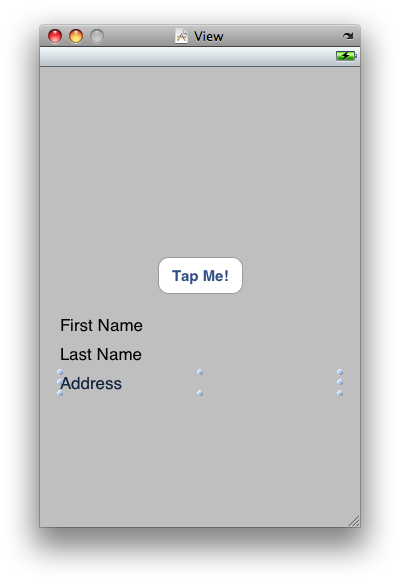
Now, add the information about this label to QuickStartViewController.h:
//
//  QuickStartViewController.h
//  QuickStart
//

#import <UIKit/UIKit.h>
#import <AddressBook/AddressBook.h>
#import <AddressBookUI/AddressBookUI.h>

@interface QuickStartViewController : UIViewController <ABPeoplePickerNavigationControllerDelegate> {
    IBOutlet UILabel *firstName;
    IBOutlet UILabel *lastName;
    IBOutlet UILabel *addressLabel;
}

@property (nonatomic, retain) UILabel *firstName;
@property (nonatomic, retain) UILabel *lastName;
@property (nonatomic, retain) UILabel *addressLabel;

- (IBAction)showPicker:(id)sender;

@end
Be sure to go back into Interface Builder and connect File’s Owner in QuickStartViewController.xib to addressLabel.
Now, we have to change the method that gets called when you click on a person in the ABPeoplePicker. As it is at the end of the QuickStart tutorial, once you select a person the picker is dismissed. So, we do the following in QuickStartViewController.m:
- (BOOL)peoplePickerNavigationController:(ABPeoplePickerNavigationController *)peoplePicker shouldContinueAfterSelectingPerson:(ABRecordRef)person { NSString *name = (NSString *)ABRecordCopyValue(person, kABPersonFirstNameProperty); self.firstName.text = name; [name release]; name = (NSString *)ABRecordCopyValue(person, kABPersonLastNameProperty); self.lastName.text = name; [name release];[self dissmissModalViewControllerAnimated:YES];return YES; }
Note that you have to delete the line that dismisses the modal view controller; if you don’t, the people picker is dismissed before you have a chance to get the address. When you delete it, the people picker will continue when you select a person. Next up, we have to write the method for when someone selects an address on the next screen. Here’s the method:
- (BOOL)peoplePickerNavigationController:(ABPeoplePickerNavigationController *)peoplePicker
      shouldContinueAfterSelectingPerson:(ABRecordRef)person
                                property:(ABPropertyID)property
                              identifier:(ABMultiValueIdentifier)identifier {
    // Only inspect the value if it's an address.
    if (property == kABPersonAddressProperty) {
        /*
         * Set up an ABMultiValue to hold the address values; copy from address
         * book record.
         */
        ABMultiValueRef multi = ABRecordCopyValue(person, property);

        // Set up an NSArray and copy the values in.
        NSArray *theArray = [(id)ABMultiValueCopyArrayOfAllValues(multi) autorelease];

        // Figure out which values we want and store the index.
        const NSUInteger theIndex = ABMultiValueGetIndexForIdentifier(multi, identifier);

        // Set up an NSDictionary to hold the contents of the array.
        NSDictionary *theDict = [theArray objectAtIndex:theIndex];

        // Set up NSStrings to hold keys and values.  First, how many are there?
        const NSUInteger theCount = [theDict count];
        NSString *keys[theCount];
        NSString *values[theCount];

        // Get the keys and values from the CFDictionary.  Note that because
        // we're using the "GetKeysAndValues" function, you don't need to
        // release keys or values.  It's the "Get Rule" and only applies to
        // CoreFoundation objects.
        [theDict getObjects:values andKeys:keys];

        // Set the address label's text.
        NSString *address;
        address = [NSString stringWithFormat:@"%@, %@, %@, %@ %@",
                   [theDict objectForKey:(NSString *)kABPersonAddressStreetKey],
                   [theDict objectForKey:(NSString *)kABPersonAddressCityKey],
                   [theDict objectForKey:(NSString *)kABPersonAddressStateKey],
                   [theDict objectForKey:(NSString *)kABPersonAddressZIPKey],
                   [theDict objectForKey:(NSString *)kABPersonAddressCountryKey]];

        self.addressLabel.text = address;

        // Return to the main view controller.
        [ self dismissModalViewControllerAnimated:YES ];
        return NO;
    }

    // If they didn't pick an address, return YES here to keep going.
    return YES;
}
Let’s go through that in more detail. The method gives us the following information: an ABRecordRef of the person we’ve selected, an ABPropertyID of the property slected (in this case, we ensure that it’s the address) and an ABMultiValueIdentifier of which address we’ve selected. It is important to note that the ABPropertyID is equal to kABPersonAddressProperty when you select any address; that is, there is only one address property. This one address property holds the values in an ABMultiValue, each at a specific index. Here are the steps we take in the code:
- The first thing we do is define our ABMultiValue, multi, and copy the contents of the selected value into it.
- Then we define an NSArray, theArray, into which to copy the multiple values. But which one do we want?
- Each address has an identifier, which the method gives to us as identifier, but we reference them by index when getting them out of the array. So, we need to create an index (which we’ll store as an unsigned integer), theIndex, and set it to the return value of the
ABMultiValueGetIndexForIdentifierfunction. Now that we have the index, we know which value of the array to store . They’re stored as type CFDictionary, which have key-value pairs for us to use, so we define an NSDictionary, theDict to put them into. - First, we need to know how many key-value pairs there are, so we use the
countmethod and store the return value in an unsigned integer, theCount. Be sure that this variable doesn&rquo;t change—you don’t want to assume that there are more members in the array than there actually are, as that can lead to nasty memory problems. For that reason I’ve defined it as a constant. - Now, we define two NSString arrays, keys[theCount] and values[theCount], and then we’re ready for action.
- Next we use the NSDictionary
getObjects: andKeys:function to copy the keys and values. The function copies the data, and we can construct our street address. For the purpose of this example, I’m going to make the address a single line, but you do with it what you want. - Finally, we create a final NSString to put the formatted address into, pull the values out of the dictionary into the appropriate place, and we’re all done!
Update 2010-07-27: Removed [ theDict release ];, some bad memory management.

Jeff,
This is Agustin from Mexico, City.
I found your blog, and the code is excellent. Works great.
I am sure you can help me to obtain the value from the email address selected.
I believe it most be using ABMultiValueGetFirstIndexOfValue. But how do we use it?
Thanks
Agustin,
Are you trying to get a person’s e-mail address from a PeoplePicker? If so, you can replace kABPPersonAddressProperty with kABPersonEmailProperty. You’ll have to make some minor changes to the code below; the address property is a MultiValue property that contains arrays, while the e-mail address property is a MultiString property that just returns multiple strings. See here for more information:
kABMultiStringPropertyType
Jeff,
Finally I am able to get a person’s email-address from a PeoplePicker. I use some of your code with minor changes extracting the email value and the email label localized.
Here is the code if you like to publish it.
Thanks for your help.
// Only inspect the value if it’s an email
// Obtains the email addres ana localized label from a PeoplePicker
if (property == kABPersonEmailProperty) {
ABMultiValueRef emails = ABRecordCopyValue(person, property);
CFStringRef emailValueSelected = ABMultiValueCopyValueAtIndex(emails, identifier);
CFStringRef emailLabelSelected = ABMultiValueCopyLabelAtIndex(emails, identifier);
CFStringRef emailLabelSelectedLocalized = ABAddressBookCopyLocalizedLabel(ABMultiValueCopyLabelAtIndex(emails, identifier));
NSLog(@”\n EmailValueSelected = %@ \n EmailLabelSelected = %@ \n \EmailLabeSelectedlLocalized = %@”, emailValueSelected, emailLabelSelected, emailLabelSelectedLocalized);
self.emailLabel.text = (NSString *) emailLabelSelectedLocalized;
self.emailValue.text = (NSString *) emailValueSelected;
// Return to the main view controller.
[ self dismissModalViewControllerAnimated:YES ];
return NO;
}
I want to really thank you for this blog. I have spent 3 days researching as a newbie how to do something like this without writing a lot of code like some of the books suggest (view controllers, arrays, etc) I adopted your code to essentially pull the email address and in the same method get the phone if it isn’t null.
Thanks a lot from the real newbie.
You’re welcome!
After reading the article, I just feel that I need more info. Could you share some more resources please?
Hello All,
I am able to read the address book contact list and its data successfully in my application, when we i run the address book code several times then at some point in time the application scratched in the simulator?
Do any body know, where is the issue?
Regards,
Pankaj
Thanks for this – really helpful.
Was just wondering why you needed to create an array of keys and values and populate those from the dictionary? They don’t seem to be used anywhere else and you continue to use the dictionary directly to generate the address for display in the label.
Robert, it’s been a while since I wrote this, but I think you’re talking about this line:
NSArray *theArray = [(id)ABMultiValueCopyArrayOfAllValues(multi) autorelease];
This is for situations where the person has multiple addresses. Each item in the array is a dictionary.
This has been great however, when I load it onto the phone, when I select an address…it launches google maps. obviously I’m missing something. Ideas?
Michael, I haven’t experienced that before. I don’t know what you’re doing that would make that happen. I’d recommend posting some code on stackoverflow.com with the iPhone tag; that’s a little more visible than my blog and more likely to get answered well. Good luck!
Thanks Jeff, I just posted the code on stackoverflow.
Michael,
Change the boolean to false on shouldContinueAfterSelectingPerson. Doc reference attached below. I’ve been learning and coding-by-google-search for several days now, so I’m very happy to finally answer a question for someone else. I hope this helps you.
If the user selects a property, the people picker calls the method peoplePickerNavigationController:shouldContinueAfterSelectingPerson:property:identifier: of the delegate to determine if it should continue. To perform the default action (dialing a phone number, starting a new email, etc.) for the selected property, return YES. Otherwise return NO and dismiss the picker.
http://developer.apple.com/iphone/library/documentation/ContactData/Conceptual/AddressBookProgrammingGuideforiPhone/400-UI_Controllers/UI_Controllers.html#//apple_ref/doc/uid/TP40007744-CH5-SW1
Thanks, Curtis!
Hrmmm. Missed a “;” somewhere. not compiling.
This is what I am looking to do. I only really want the StreetKey but can tweak whats here.
Off to find the missing semicolon, course it could be something else Im new.
Well… I found the “:” The simulator opens up but the app does not stay open? Hrmmmm, what now, any ideas?
Frank, if the app is crashing, you can use
gdbto debug it. In Xcode, press Command + Y to do a Build and Debug, which starts your app attached togdb. When it crashes, you’ll get a backtrace.gdb, Great. I appreciate your response. Im new to interface and only familiar with “C” although I have had some programming in the past.
I found it. I left a variable reference on the “View” screen and I had “commented” it out in the .m and .h files.
I’ll just have to tweek the rest. Its not quite doing what I want just yet but its opening and allowing for a selection.
Thanks.
did every thing on here, but when i select the address from the contact, it doesn’t show up on my label, only the name shows up still. please help :(
in case i messed something up, here is what i have:
ade, did you set an outlet in Interface Builder for
addresslabel? Try setting a breakpoint at this line:Make sure that
self.addresslabelisn’tnil.Jeff thank you,
Yes i did: IBOutlet UILabel *addresslabel;
I dont set self.addresslabel anywhere other than .text = address; so i dont think its nil. when i insert the breakpoint and hover over address on the line self.addresslabel.text = address; the address does show up in read with a (null after it), i am new to xcode and mac programming, so my debugging skills are quite poor.
here is the rest of my implementation class from the beginning, maybe something is off in there, i have been playing with this all day to no avail:
#import “addressbookViewController.h”
@implementation addressbookViewController
@synthesize firstName;
@synthesize lastName;
@synthesize addresslabel;
– (IBAction)showPicker:(id)sender {
ABPeoplePickerNavigationController *picker = [[ABPeoplePickerNavigationController alloc] init];
picker.peoplePickerDelegate = self;
[self presentModalViewController:picker animated:YES];
[picker release];
}
– (void)peoplePickerNavigationControllerDidCancel:(ABPeoplePickerNavigationController *)peoplePicker {
[self dismissModalViewControllerAnimated:YES];
}
-(BOOL)peoplePickerNavigationController:(ABPeoplePickerNavigationController *)peoplePicker shouldContinueAfterSelectingPerson:(ABRecordRef)person {
NSString* name = (NSString *)ABRecordCopyValue(person,kABPersonFirstNameProperty);
self.firstName.text = name;
[name release];
name = (NSString *)ABRecordCopyValue(person, kABPersonLastNameProperty);
self.lastName.text = name;
[name release];
//[self dismissModalViewControllerAnimated:YES];
return YES;
}
Just defining the
IBOutletisn’t enough. You have to wire the outlet up in Interface Builder. Holding control, click and drag from “File’s Owner” to the address label, then select youraddresslabeloutlet. Without this connection,self.addresslabelwon’t actually point to anything.i did all of that as well, my nib file has been wired up properly
i am creating this for the ipad, could that be causing the problem some where, didnt think it should
so i got it to work, i couldnt tell you how, but now the state and zip are missing…getting close..thx for the help
ok, ignore the previous comment, just needed to expand the address label, n00b mistake…but my real problem is that after the address is display, it also displays (null), like so:
111 cocoa rd, largo, md 20721 (null)
any advice
thx again, i know i am becoming bothersome
You’re not a bother; this blog exists to help. Now, onto the problem. The string that you’re putting into the text view is a format string:
The last element is the object in the dictionary for
kABPersonAddressCountryKey, which corresponds to the country in the person record. Because that isn’t specified, the result isnil, which shows up as “(null)” when you try to put it in the format specifier. There are a few ways to fix this, depending on your needs. The simplest is to take out the country:More complicated, but likely better, would be to check to see if the string is equal to
niland, if it isn’t, to add it in.thx Jeff, i went ahead and removed the countrykey for now and it works, i will try adding in the if statement later on… on to email, should be easier this time around. appreciate the help once again
is it possible to get the address to show up by just click the contacts name, tried setting the return value to yes, removing the if statement and making it one big method, but neither worked, still had to drill down to the address field….thx in advance
Sure, it’s possible, but you have to be prepared for three situations: when the user doesn’t have any addresses defined, when they have one address defined, and when they have more than one address defined.
What you’ll want to do is to modify
-peoplePickerNavigationController:shouldContinueAfterSelectingPerson:. In that method, returnNOto return from the people picker; you’ll want to do that (and set the label contents appropriately) if there’s exactly one address associated with the contact. ReturnYESif you need to allow for selecting which of multiple addresses to return. For users with no address, you’ll have to have a way to show an error.i thought that should have been the case as well, but doesnt work for me again, so i must be doing something worng, in my method :
peoplePickerNavigationController:(ABPeoplePickerNavigationController *)peoplePicker
shouldContinueAfterSelectingPerson:(ABRecordRef)person
property:(ABPropertyID)property
identifier:(ABMultiValueIdentifier)identifier {
i return NO, but i am still getting to the address select screen
Different method. There are two:
-peoplePickerNavigationController:shouldContinueAfterSelectingPerson:and-peoplePickerNavigationController:shouldContinueAfterSelectingPerson:property:identifier:.The first gets called before the second. If you return
YES, then the people picker displays individual attributes on another screen (this is where you select the e-mail address, address, etc.) and calls the second method when you select one.Yea Jeff, that was the method i originally tried and this is probably a dumb question but when i set that method to NO, the address doesn’t show up because it is set in the
-peoplePickerNavigationController:shouldContinueAfterSelectingPerson:property:identifier:
and i cant set it in the first one because the dictionary and array aren’t declared til this method:
-peoplePickerNavigationController:shouldContinueAfterSelectingPerson:property:identifier:
is it possible to just have one method and set all the labels in there.
Yes. Since you can’t use the second method, you have to go into the
ABRecordyourself and dig out the address.oh ok
Hey Jeff,
Is it possible to change anything in the AddressBookUI?
I am looking to capture elements from the standard UI along with some custom fields and I want to extend the UI to achieve this.
Do you know if this is possible or will I need to create my own from scratch?
/Phoney
Phoney,
I don’t think that the UI is designed to be subclassed; you’d have to create something from scratch.
Yeah, I thought as much. Ho-Hum…
Your code example has been very helpful – saved me buckets of time trawling through the documentation.
Can anyone help me?
I just only need the addresses fields to be in the contact info, and hide the all other fields, is it possible?
Thanks in advance.
Ruben,
Are you trying to display a contact info sheet and hide everything but addresses? That’s definitely possible. Use an
ABPersonViewControllerto display the information, and set itsdisplayedPropertiesproperty to the desired fields.Hi,
Thanks for a great article and the blog!
I’m looking for a way to do couple of things with the picker, and hope you will be able to help:
1. When is the best time to call for picker when the view is loaded?
I guess that my options are: viewWillAppear, viewDidAppear and viewDidLoad.
Currently, only the viewDidAppear shows me the picker, but I don’t understand why the other options do not work.
2. How do I know that the picker has finished loading?
I’m looking for some “hack” where I’m going to get all the subviews of the control, and I need to make sure I do that when the view 100% loaded.
I know this is too much for a simple blog comment, but I’ve been reading all the relevant blogs, articles, documentation… and couldn’t find any answers.
Thanks again,
I have to suggest against doing anything to modify the picker. Introspection of its subviews will work, sure, but Apple is at their leisure to change how that works, reject your application(s) if you mess with it too much, or do something that causes your app to crash when you attempt this.
I’m also not aware of any callbacks that you can use to discover when the picker has finished loading; if you absolutely need to do this, you’re going to have to do some introspection to determine this. Since
ABPeoplePickerNavigationControlleris a subclass ofUINavigationController, which is itself a subclass ofUIViewController, you can probably use the-isViewLoadedmethod to determine if it’s loaded its view yet.Thanks for the question!