So here’s an annoyance. Having just installed SynergyKM, a great front-end for the awesome command-line utility Synergy, launching it would result in the following prompt:
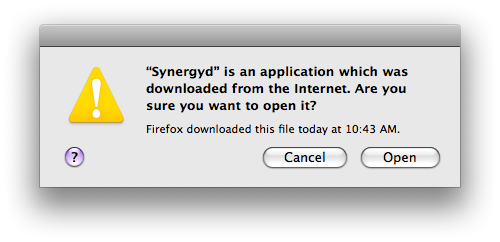
To fix this, you need to remove the extended attribute com.apple.quarantine that’s on the file. Fire up Terminal and enter the following commands:
sudo xattr -d com.apple.quarantine /Library/PreferencePanes/SynergyKM.prefPane/Contents/Resources/Synergyd.app
sudo xattr -d com.apple.quarantine /Library/PreferencePanes/SynergyKM.prefPane/Contents/Resources/Synergyd.app/Contents/MacOS/Synergyd
That will remove the flags and prevent the prompt.
Normally, you’d only see this prompt once, but since installing it for all users changes permissions such that your user account can’t remove the attribute, it isn’t removed.
Note: This is assuming that you’ve installed it for all users. If you’ve installed it for one user, it’ll be in ~/Library, not /Library.
Update: I’ve submitted a patch to SynergyKM’s SourceForge page, so if they accept it this will no longer be an issue.

…
you are SUCH a nerd.
when did this happen?
How long have you known me?
Since we were 5!
okay fine. maybe i just didn’t want to admit that i only have super geeky friends!
Yay! Thanks, you fixed this for me :)
Apparently, they haven’t accepted that patch, because this still happens :-(
Yes, last I looked the project, unfortunately, looked quite dead.