June 29, 2008, 6:47 pm
Wordpress.com is, don’t get me wrong, a great service. They offer no-hassle blog hosting for free using WordPress, my blogging platform of choice. At a certain point in a young blogger’s life, however, it’s time to move on to using WordPress’ more advanced features; uploading new themes, hand-editing theme components, and maybe even throwing Google AdSense on there. Wordpress is always free from WordPress.org, is easy to set up, and very easy to customize and administer. So, with a little help from blog-well, I was ready to go. This blog post is a derivation of blog-well’s work (click that link over there to see it), but I’ll be focusing on DreamHost where they focused on GoDaddy.
- Step 1: Obtain Hosting.
Obviously the first step here is to sign up for a hosting account. DreamHost’s process is simple enough that I won’t bore you with instructions.
- Step 2: Tell DNS to point to WordPress.com
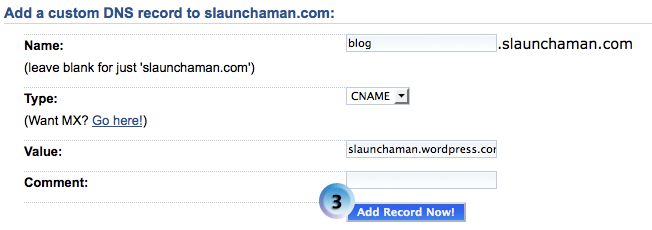
Now we have to tell your blog’s DNS servers to point to WordPress.com, where your blog is currently. This step might seem counterintuitive—after all, we’re trying to point WordPress.com to your blog, not the other way around—but this is how you let WordPress know that you’re in control of your domain. Assuming that you want your blog at blog.yourdomain.com, you need to make a “CNAME” entry as follows:
blog 14400 IN CNAME yourblog.wordpress.com
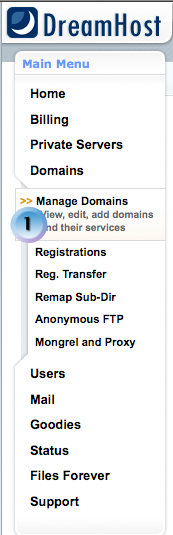
Once that change propagates (which can take anywhere from a few minutes to a few hours, and you may need to reboot your computer), visitors to blog.yourdomain.com will be redirected to yourblog.wordpress.com. For DreamHost, follow these pictures:

- Step 3: Sign Up for WordPress.com Domain Forwarding
This part, unfortunately, costs a little bit of money—$10 per year. When you’re logged in to WordPress.com and at your dashboard, click “Upgrades” and then “Domains.” Enter your new domain in the field once you’ve paid for 10 credits and you’ll see it appear on the domain screen.
- Step 4: Tell WordPress.com to Point to Your Domain
- In the “Domains” view on your WordPress.com dashboard, click “put blog here” next to your domain. This tells WordPress to take all traffic sent to yourblog.wordpress.com to blog.yourdomain.com or whatever you want. The end result should look like this:

- Step 5: Re-do Your Custom Domain
Go into your domain’s DNS settings again and delete the CNAME entry you made earlier. Now you’re all set to go! If you’re using DreamHost, you can do the easy install of WordPress to have it automatically updated to the latest version and the database automatically created for you.
June 27, 2008, 8:00 pm
I’ve moved this blog over to Dreamhost, which means a couple of things: first, I’m managing my own WordPress installation now, which is pretty cool. Don’t get me wrong, WordPress.com is great—and I’m still technically using it to forward traffic to my old address here—but managing your own server is pretty cool. I can install whatever themes I want and edit them as I see fit, without paying money to do so. Sure, I’m paying money for hosting, the domain name, and the domain name forwarding from WordPress.com, but at least now the blog is here on my own terms.
Moving the blog here was a long and arduous process, one that required patience on my part and that gave me a crash course in DNS for web servers. I was able to do it mostly off of a post at blog-well.com, and since the attached PDF has rights to edit it built in, I think I’ll work on some instructions for this process to help others along. Keep your eyes peeled!
June 27, 2008, 6:30 pm
This blog may be temporarily unavailable as I switch it to blog.slaunchaman.com. Be patient — it’ll soon be back up and all of your old links (including RSS subscriptions) will still work.
June 21, 2008, 10:17 am
Maybe it’s the two-hour infomercial in California I attended. Maybe it’s the half-dozen times each night last week where one of us would say, “If I only had an iPhone, I could look up…” Maybe it’s all the cool iPhone applications that are going to come out. Or even the $200 price tag. Whatever it is, I really want an iPhone. Watching Steve Jobs’ Keynote address (from an overflow room, as I hadn’t spent the night outside Moscone West in order to secure a good seat), I held out hope for him to say, “…and it’s available now!” Alas. Not only could I not get one at WWDC, but Apple has deigned not to allow Internet pre-sales. I can’t even say that I will get an iPhone when the new version comes out, as I have to go to the store to get one, and they might be sold out by the time I get there.
More news also recently cropped up lately, saying that AT&T might not deliver on the $200 price point for people (like me) currently in a regular AT&T contract before the 2-year phone replacement cycle is over. That’s pretty bad news, and it raises one obvious, but absolutely vital, question: how much is it going to cost me? Inquiring minds want to know.
June 9, 2008, 4:46 pm
The big thing at WWDC is always the keynote address. Steve Jobs inevitably riles up the crowd (mostly composed of Mac geeks) by some groundbreaking announcement. This year’s keynote, while not as feature-rich as previous years’, at least gave me a month to wait for the iPhone 3G that I’ll inevitably have on pre-order as soon as that’s an option (does anyone want a black Razr?). The other big announcement at the keynote, aside from all the presentations by iPhone software engineers, was Apple’s replacement for .Mac, “MobileMe”. I’m of two minds about this service. First, I think the idea of the service is great. I sync my iCal, Address Book, etc. with Google right now through Spanning Sync; MobileMe is more expensive but also does photo albums and a 20 GB iDisk. I imagine I’ll try the 60-day trial and either not use it or enjoy it enough to subscribe. The part I don’t like is the name; Apple’s marketing department is usually top-notch, yet the logo for MobileMe is eerily reminiscent of Windows ME. Hopefully the two products won’t have the same “success” stories.
Time to go to my first session (which I can’t legally talk about here).
June 8, 2008, 12:17 pm
I’m headed out today to California for WWDC. This is my first business trip, so I’m really looking forward to it! I don’t know how much of a reliable Internet connection I’ll have, but I’ll try to post impressions of the conference and the city.